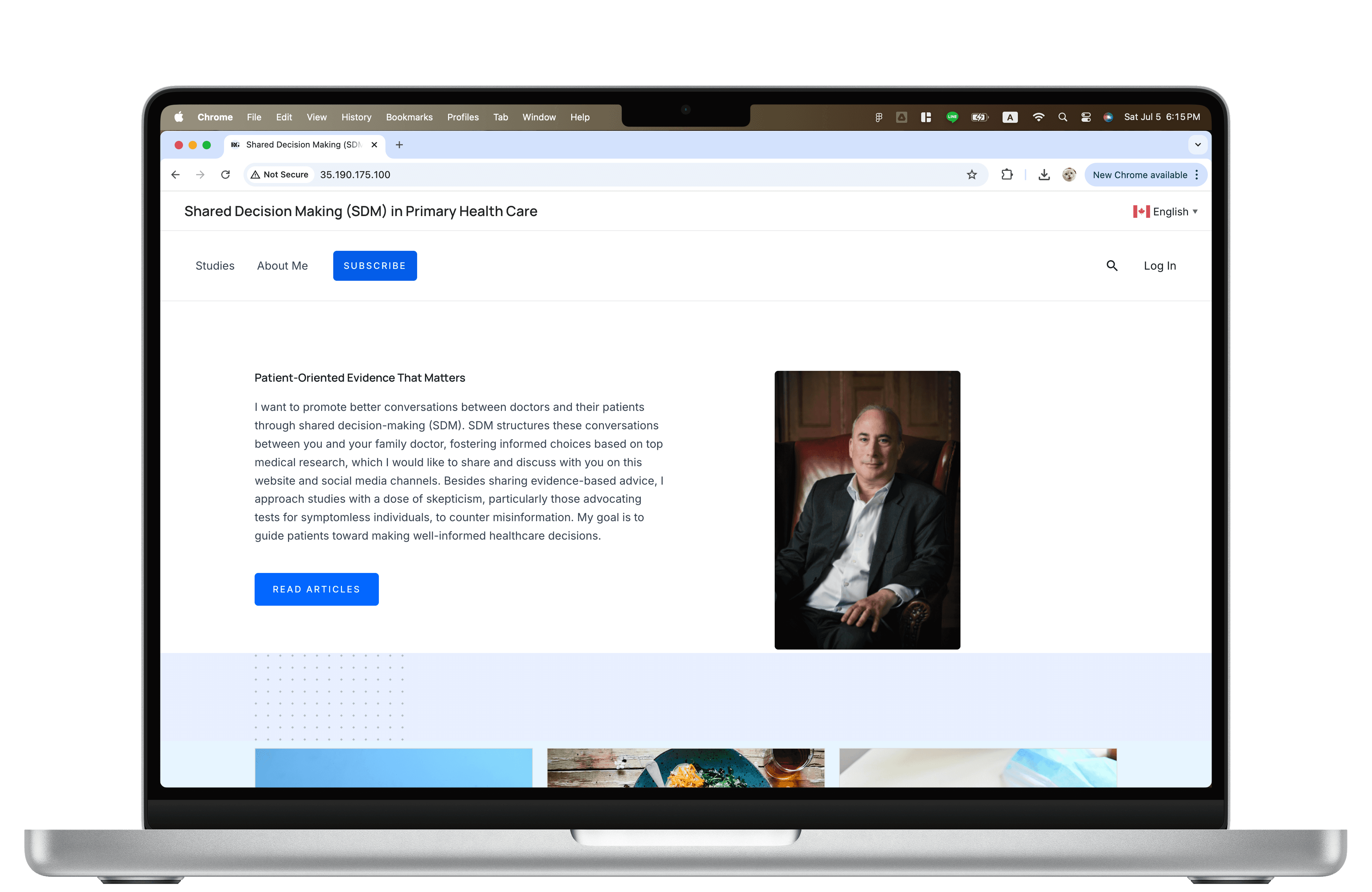
A searchable medical research archive website
website for Dr. Ronald Grad
Role
Product Designer,
Developer
WORK
UX, WordPress,
Cloud deploy
Tools
Figma, WordPress, Google Cloud VM
Timeline
1 - 2025. 6
Project Overview
This 12-week practicum project was completed at the Department of Family Medicine, McGill University.
I collaborated closely with my supervisor through weekly check-ins and was solely responsible for the
UX design, WordPress development, and cloud deployment of the website.
01 | Objective
Design a website to organize and showcase medical research posts (POEMs), making them searchable, filterable, and accessible for the public.
02 | Role & Deliverables
Led the full project from scratch:
designed wireframes, developed the site in WordPress, deployed to Google Cloud, implemented tag filters, search, multilingual features, and sign-in function.
03 | Challenges
There was no existing website. I had to build everything from the ground up.
04 | Outcome & Impact
The result is a live platform that meets user needs for readability and accessibility. It helped Dr. Grad share medical content more effectively and can grow with future research posts.
Design process
1. Understand & Scope
Define goals and identify scope with the supervisor
2. Design & Iterate
Created and refined wireframes based on feedback
3. Build & Deploy
Developed the full site and deployed on Google Cloud
Project Goal
Design a professional website to help Dr. Roland Grad share his POEMs (Patient-Oriented Evidence that Matters) insights.
The goal was to make reliable medical insights accessible to anyone seeking trustworthy health information.
Objective
My supervisor outlined the following objectives for the website:
Present articles with their complete references and sources
Organize medical information for easier navigation
Provide links to relevant medical resources and official websites
Include contact information
Multi-language support
User sign-in and guest mode
User discussion forum
Questions I Asked to Clarify Scope
To better align the project with real-world needs, I asked my supervisor targeted questions early in the process:
Who are the target users?
Patients and family doctors who want to quickly understand medical research.
How often will new articles be added?
Ideally updated daily; currently around 2–4 articles per week.
How I Comprehend Objective
These two questions shaped how I organized the core objectives of the site. This categorization helped me prioritize essential functions early on, clarify overlapping needs, and guide both the information architecture and feature planning.


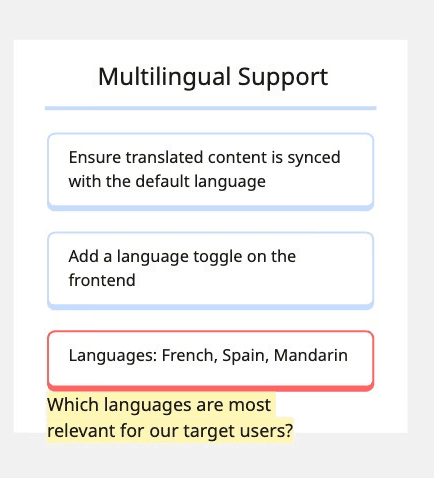
I added design notes and questions during this process to align decisions with user needs and project constraints.
Final objectives
Easier to implement and maintain, still allows feedback.
Topics were too diverse and unevenly distributed for fixed categories; tags scale.
Based on the current user base, set up to add more later.
Evaluating Tools for Building the Website
Given the 12-week timeline, the need for frequent content updates, and my basic coding background, I explored tools that would let me design and launch the site efficiently without writing code.
Instead of coding the site with HTML/CSS/JS, I focused on low-code and plugin-supported platforms that allowed me to:
Build a clean and responsive interface
Add features like search, filtering, and multilingual support
Let my supervisor manage content after launch
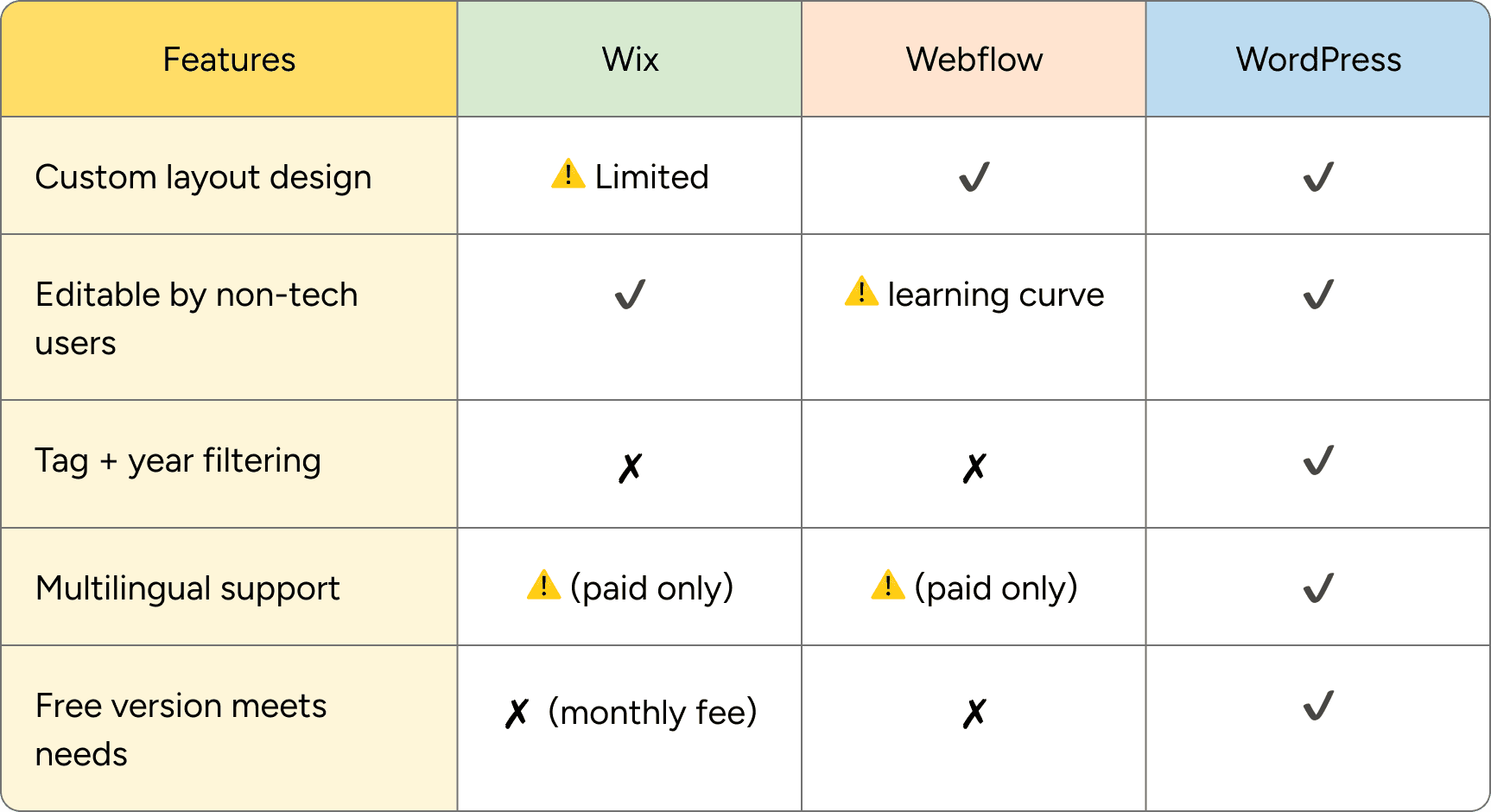
I compared options like Wix, Webflow, and WordPress.
In the end, I chose WordPress because it offered the best balance of flexibility, scalability, and ease of use and had the plugin support I needed to meet all project goals.
Design & Iterate
Wireframe
As I iterated, I explored different homepage layouts to balance simplicity and content visibility.


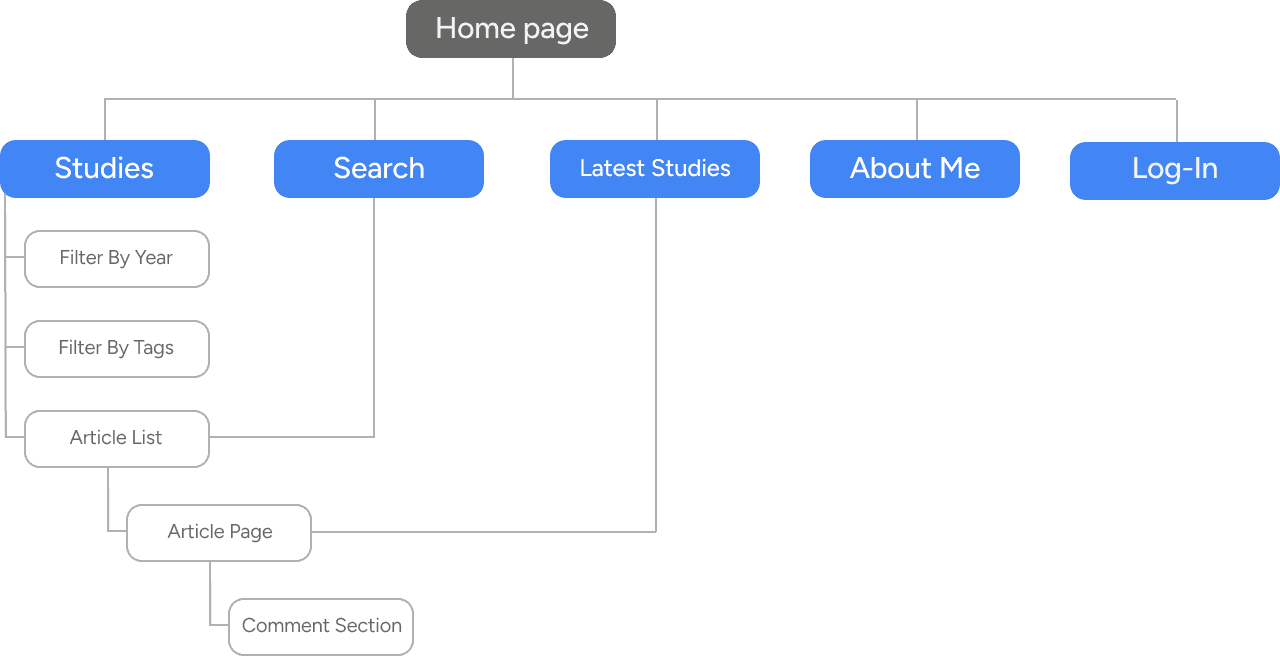
Sitemap
Building with Wordpress & Elementor


Deployment
To make the site live and accessible to the public, I deployed it using Google Cloud as requested, since the department already had a paid account.
Here’s a simplified overview of the steps I handled:
Built and tested the full website locally using LocalWP
Deployed to Google Cloud, since my supervisor already had an active account
Set up a basic Ubuntu VM with LEMP stack (Linux, Nginx, MySQL, PHP)
Uploaded all content and database manually
Installed WordPress core and configured the site
Enabled SSL and completed setup using the GCP IP address (domain not yet connected)
While I don’t have a full development background, I independently completed this deployment through hands-on learning, documentation, and debugging.
Delivery
01
Full feature set
Search, tag filtering, multilingual toggle, comments, sign-up, responsive layout.
02
Custom tag system
Built and styled from scratch — the template had none.
03
Cloud deployment
Live on GCP, learned through docs, tutorials, and debugging.
Home Page
Studies Page
About Me Page
Reflection
What I Learned:
Structure makes everything easier
Grouping the project goals into categories helped me stay on track and communicate clearly with my supervisor. It made decisions easier later on.
I don’t need to know everything (at first)
I didn’t know how to deploy a website or customize WordPress tags but I figured it out. I watched YouTube tutorials, asked ChatGPT when I got stuck, and just kept testing things until it worked. It was a great reminder that self-learning goes a long way.
Documentation saves time (and sanity)
Whether it was plugin settings, deployment steps, or design feedback, keeping notes helped me stay organized and avoid repeating mistakes. It made everything smoother, especially when I had to go back and fix things later.
What’s Next
Add a subscription feature
We’re planning to let users subscribe and get updates when new articles are posted.
Connect a domain
The site is currently on an IP address. I’ll connect a custom domain once the budget allows.